On the Cluster Settings page, you can view, modify, and remove information about clusters registered to mKC. Additionally, you can access extended features related to the cluster, such as Kafka Connect Cluster or Schema Registry Cluster, and collectively view information like Client Quotas.
Viewing, Modifying, and Removing Cluster Information
In the General tab of the Cluster Settings page, you can view and modify information related to the cluster, including details about the cluster, brokers, and ZooKeeper.
You can also remove registered cluster information.
Cluster Settings
You can view information about the registered cluster, such as the name, version, type, as well as whether the ACL is enabled, and security settings.
ACL Enabled
The status of ACL activation, which manages access control for Kafka components like topics, consumer groups, and transactions, is displayed.
Security Type
Security settings for the cluster, such as the security protocol and authentication mechanism, are shown. For further details on each security setting item, refer to the Cluster Register Security Settings section.
Security settings are composed of the following elements. Each piece of information is displayed or hidden based on the cluster's security configuration.
- Protocol Information: Shown when cluster security is applied (i.e., when the Security Protocol is not PLAINTEXT).
- Mechanism Information: Shown if the cluster is not of the Amazon MSK type and uses a security protocol including SSL.
- SSL Certificate Upload Button: Shown when using a security protocol that includes SASL.
Brokers
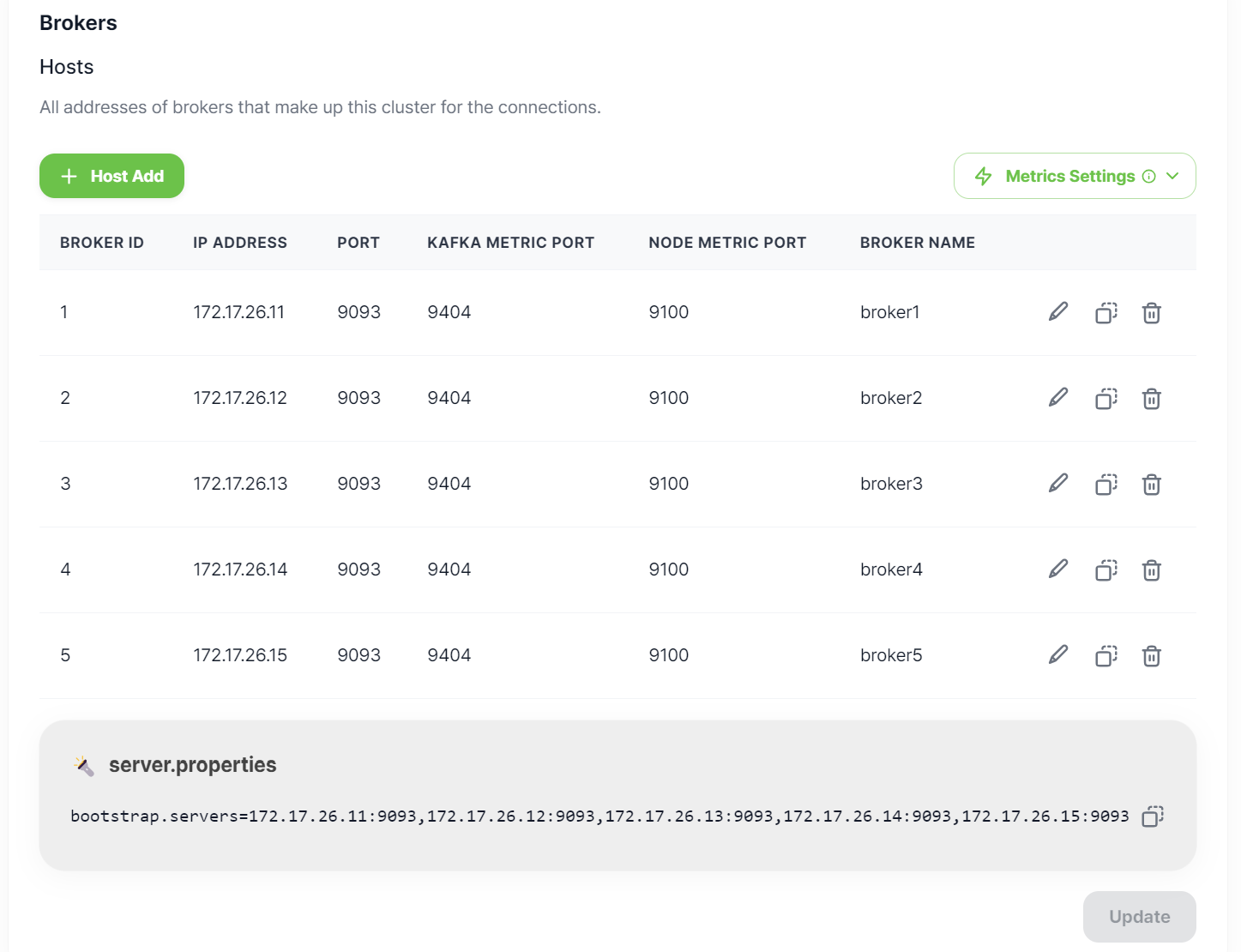
You can view and edit/duplicate/delete from the list of all the brokers that make up the Kafka Cluster.
If you are using the Metric Exporter, you can configure detailed information about the broker's metrics by enabling the settings in the [Metrics Settings] panel. However, if you activated the metric settings during cluster registration, they cannot be disabled later.
If you have any brokers information to add, do so by clicking Host Add.
Caution! Once metric settings are enabled, they cannot be changed to disabled.
 ZooKeeper
Basic
You can view basic information such as the ZooKeeper Namespace, authentication information, and host information.
Auth
It is optional, and it is needed to set access control lists (ACL) for producers and consumers. If ZooKeeper authentication is enabled, you must enter the following authentication information for Kafka versions 2.6 and below.
-
Authentication Module: You can choose an authentication mechanism to manage user authentication. The options provided are NONE and DigestLoginModule. Select NONE if you do not want to use authentication and select DigestLoginModule if you want authentication using a username and an encrypted password.
Hosts
You can view and edit/duplicate/delete from the list of all the ZooKeeper servers that make up the ZooKeeper ensemble. This only lists the servers that are connected to the Kafka Cluster.
If you are using the Metric Exporter, you can configure detailed information about the broker's metrics by enabling the settings in the [Metrics Settings] panel. However, if you activated the metric settings during cluster registration, they cannot be disabled later.
If you have any ZooKeeper information to add, do so by clicking on Host Add.
Use JMX Metric
When using JMX Exporter with brokers and ZooKeeper, JVM metrics are provided, enabling Kafka performance monitoring. If JMX Exporter is not used, metrics queried via JMX may not be displayed.
Use Node Metric
When using Node Exporter with brokers and ZooKeeper, node metrics are provided, allowing system performance monitoring. If Node Exporter is not used, metrics queried via node may not be displayed.
Caution! Once metric settings are enabled, they cannot be changed to disabled.
Removing Cluster
It removes the cluster information registered in mKC. This action only deletes the information registered in mKC, and not the actual cluster. Once the cluster registration information is removed, the monitoring service will no longer track the status of the cluster.
Use caution when removing a cluster. When a cluster is removed, the Extensions information connected to the current cluster is also removed. Similar to the cluster removal though, this does not delete the actual extension clusters (Kafka Connect Cluster, Schema Registry Cluster), but just the information registered in mKC.
Extensions
In the Extensions tab on the Cluster Settings page, you can view all the Kafka Connect Clusters and Schema Registry Clusters connected to the cluster.
Kafka Connect Cluster
Kafka Connect is a tool for stably streaming data between Kafka and other data systems. Further details can be found in the Kafka Connect Cluster document.
Schema Registry Cluster
Schema Registry is a central schema repository that manages and validates schemas, which are the structures and formats of data. By operating multiple schema registry servers together through a schema registry cluster, high availability and scalability can be ensured.
Client Quotas
Client Quotas allow you to control the broker resources that clients can use, or limit the number of work requests. You can set Client Quotas in Client Quotas tab on the Cluster Settings page. Further details can be found in the Client Quotas document.